 BASKETBALL
Basketball scoreboard & broadcast graphicsEvery basket, on cue.
The Cuelio playout client for live basketball on CasparCG. It keeps the game itself, score, both clocks, fouls, timeouts and possession, so pressing +3 changes the score and every graphic on air follows.
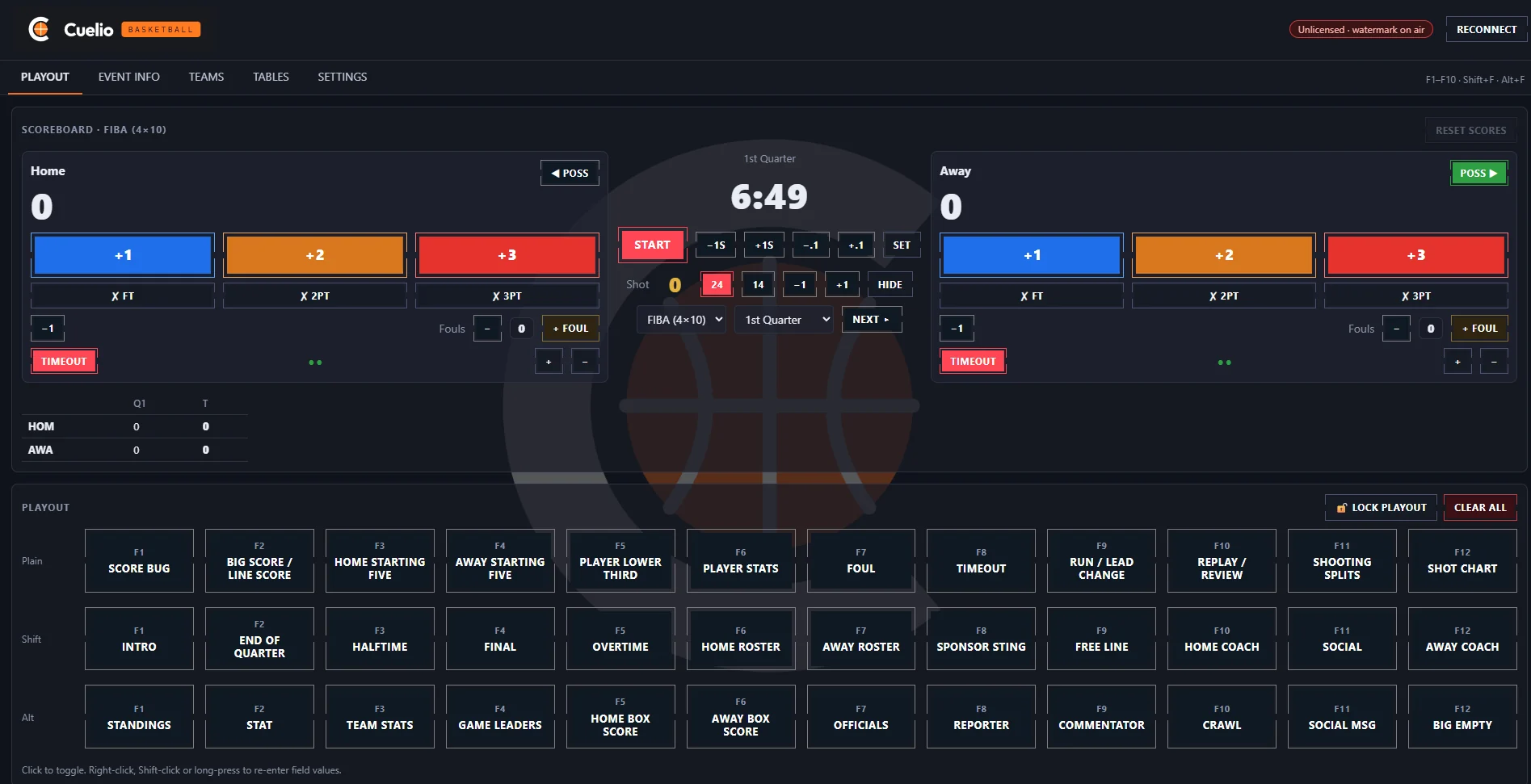
Three points from deep. One click.
This is the Cuelio Basketball scoreboard, late in the fourth quarter. Score, call a foul or a timeout, reset the shot clock, and watch the score bug follow, just as it does on air.
| Team | Q1 | Q2 | Q3 | Q4 | OT | T |
|---|---|---|---|---|---|---|
| HOM | 0 | 0 | 0 | 0 | 0 | 0 |
| AWA | 0 | 0 | 0 | 0 | 0 | 0 |
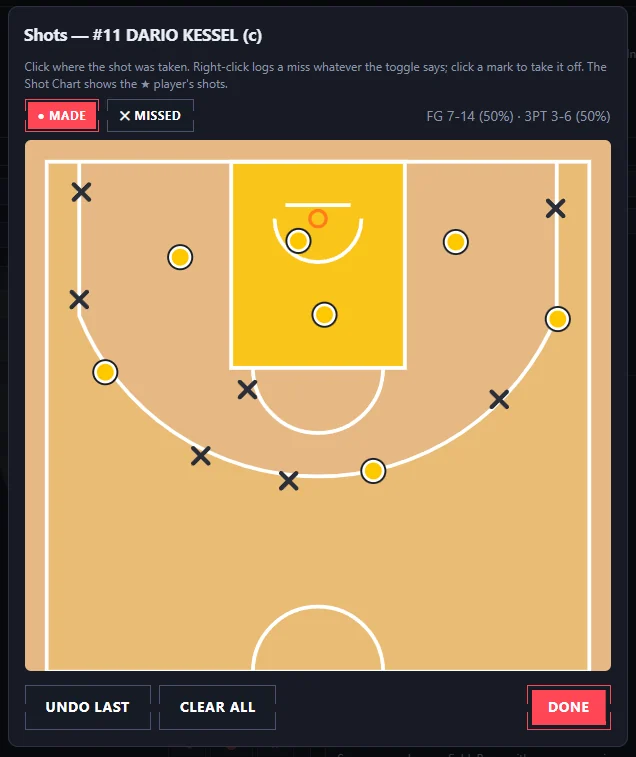
Click where the shot was taken.
This is the shot map from the Teams tab. Pick Made or Missed and click the court. FG and 3PT add up as you go, and the Shot Chart graphic (F12) draws the same shots on air.
Thirty-six graphics, three rows of F-keys.
Every graphic has its own key: F-keys on the top row, Shift and Alt below. Click a key to put it on air, and click again to take it off, just like in the app.
Short names, score, game clock, shot clock and period, with team fouls, bonus, timeouts and possession, all following the scoreboard.
Set it up once, before tip-off.
Teams, rosters and tables are filled in before the game. Everything saves as you leave a field, so during the game you only press buttons.
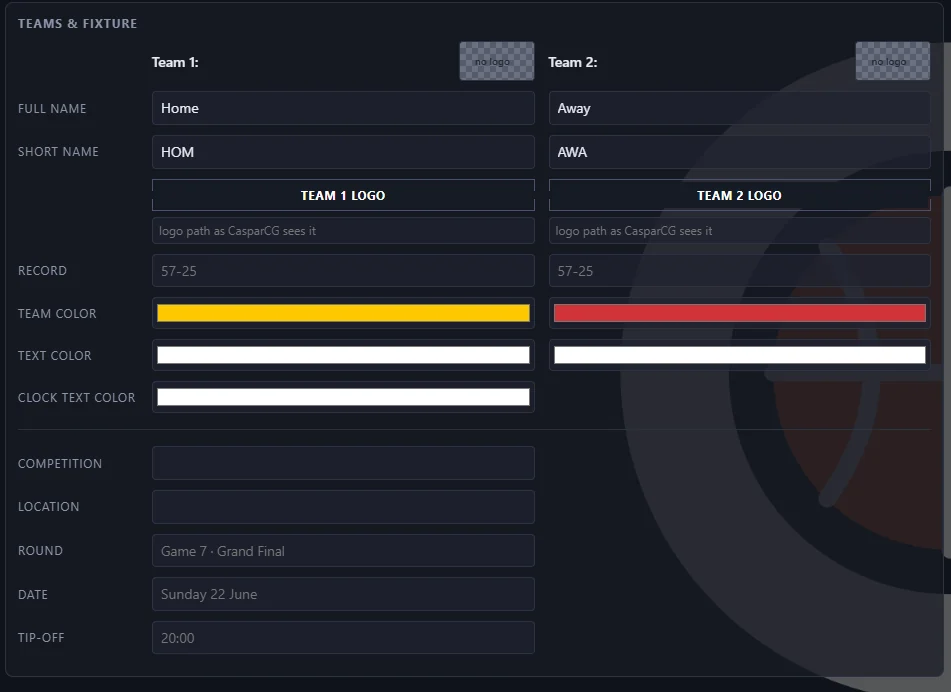
Teams and fixture
Names, logos, records and colours for both sides, set once before tip-off. Every graphic picks them up.
- Three-letter short names for the score bug
- Team, text and clock text colours
- Competition, location, round, date and tip-off for the intro
Shot map
Click where each shot was taken. Right-click logs a miss, and clicking a mark takes it off.
- FG and 3PT made, attempted and percentage
- Undo last and Clear all
- The Shot Chart graphic draws the picked player's shots
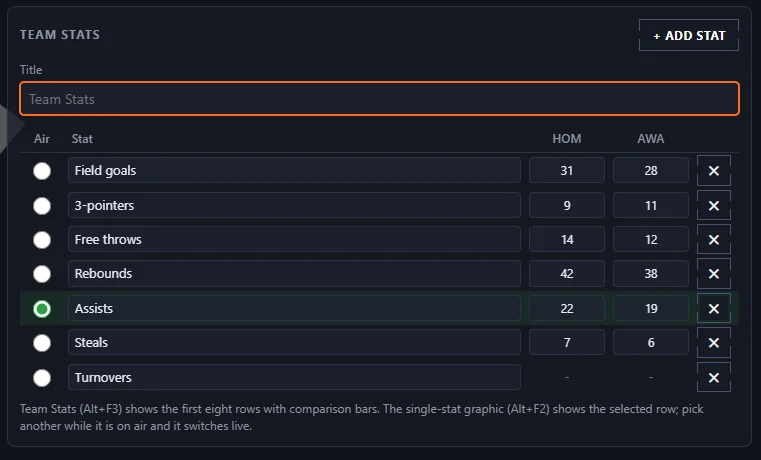
Team stats
Stat rows with a home and an away value, for the Team Stats and single-stat graphics.
- Team Stats shows the first eight rows with comparison bars
- The radio button picks the row the Stat graphic shows
- Pick another while it is on air and it switches live
Safety nets
The settings that keep a live game on air when something goes wrong.
- Autosave every few seconds, and restore last backup
- Save the match to a file and open it again
- Chroma mode in green or blue for a single HDMI feed

Made for the way basketball is broadcast.
- 01
Scoring built for basketball
+1, +2 and +3 for each side, and −1 to take a point off. Points land in the line score for the quarter, and graphics on air update at once.
- 02
Game clock and shot clock
Start and stop with the Space bar. The game clock shows tenths in the last minute and stops at the buzzer; 24 and 14 reset the shot clock.
- 03
Team fouls and bonus
Count team fouls for the quarter. When a side reaches the limit, BONUS lights under the other team, on the panel and on the score bug.
- 04
Timeouts
Timeout stops both clocks and takes one off the allowance. The dots show what is left, and the Timeout graphic shows it on air.
- 05
FIBA and NBA rules
Pick the rule set, and quarter length, overtime, timeouts, bonus and foul-out limits follow it.
- 06
Rosters and box score
Starting five and bench, with cut-outs and clips. Type the box score as the stats crew calls it, or import a roster CSV.
- 07
Starting five spotlight
The team card and the court, then Next spotlights each starter in turn, or Auto spotlight steps through on its own.
- 08
Shot charts
Click where each shot was taken, made or missed. FG and 3PT work themselves out, and the Shot Chart graphic draws them.
- 09
Thirty-six graphics on F-keys
Three rows: F-keys, Shift and Alt. Big graphics clear the small ones first, so two never stack up.
- 10
Undo and autosave
Undo last reverses a wrong score, foul or timeout. Autosave keeps the game, and the app offers it back after a crash.
- 11
One HDMI output
Chroma mode keeps a green or blue key colour on program, so a laptop with one HDMI port can feed the mixer.
- 12
A second screen in the browser
Any computer, tablet or phone on your LAN or Wi-Fi can open the panel to score and run the clocks. Lock playout keeps the buttons on the main screen.
Make it yours, feed it live, take it to air.
HTML Template Designer
Build the graphics, or start from a Marketplace pack.
Explore 02 · READScoreboard OCR
Read the clock and score straight off the venue board.
ExploreYour playout client
Take it to air from one rundown, in your sport edition.
You are hereAbout Cuelio Basketball.
What does Cuelio Basketball run on?
A CasparCG server, on the same computer or anywhere on your network. The graphics are HTML templates. CasparCG 2.5 can load them straight from the panel, or you can copy them into the server.
Does it use FIBA or NBA rules?
Both. Pick FIBA (4 × 10 minutes) or NBA (4 × 12 minutes) on the scoreboard, and the quarter length, overtime, timeouts, bonus and foul-out limits follow.
Can the stats crew work on another computer?
Yes. Any computer, tablet or phone on your LAN or Wi-Fi can open the panel in a browser to score, run the clocks or type the box score. Lock playout keeps the playout buttons on the main screen only.
Can I play out from a laptop with one HDMI port?
Yes. Chroma mode keeps a solid key colour on the program output, and your vision mixer keys it out. Use green for most games and blue when a team plays in green.
What happens if the computer crashes mid-game?
Autosave keeps the game every few seconds. When the app starts again it offers to restore it, and Restore last backup does the same on demand. You can also save the match to a file.
Can I play every graphic from the keyboard?
Yes. F-keys, Shift + F-keys and Alt + F-keys fire the three rows of the playout grid. Space starts and stops the game clock, and Clear all takes everything off air. In the desktop app F11 toggles full screen, so the F11 buttons are clicked.
Can I change the graphics?
Yes. Every graphic is an HTML page with documented field IDs, so you can restyle it in HTML Template Designer or build your own.
How does licensing work?
Every install starts with a 7-day free trial with everything working. Each licence key works on two computers, and the app only needs the internet once, to activate.
What do I need to run it?
A computer running Cuelio Basketball, CasparCG (free and open source) and a vision mixer. How it works shows both ways to wire it: key and fill over SDI, or chroma key over one HDMI or SDI cable.
Pricing for Cuelio Basketball.
Licensed from three months to lifetime. Start with the free trial and pick a package when you are ready.
Licences run from £109 for 3 months to £1,799 for life, each on 2 computers, with a 7-day free trial.
Run your next basketball broadcast on Cuelio.
Install it and you get seven days with everything working, no key needed. Buy a licence any time and paste the key in to keep going.
If Windows shows “Windows protected your PC”, choose More info, then Run anyway.